Mods — folder conventions & how loading works
The mod types (and where they go)
| Type | Looks like | Drop into | Loaded by | Needs UE4SS |
|---|---|---|---|---|
| Palladium mod | folder with mod.lua |
./mods/<ModName>/ |
Palladium, inside the game | yes (via Palladium) |
| Lua | folder with scripts/main.lua |
./mods/<ModName>/ |
UE4SS directly | yes |
| Script | folder with mod.json |
./mods/<ModName>/ |
the panel, outside the game | no |
| Loose .pak | a single SomeMod_P.pak (sometimes with .ucas/.utoc) |
./paks/ |
the stock pak system | no |
| LogicMod (Blueprint) | a .pak the author calls a LogicMod / BP mod |
./logicmods/ |
BPModLoaderMod | yes |
A Palladium mod is the one to write. It needs nothing but Palladium — no panel, no token, no process — and it reaches the engine, which is where mods belong. A raw Lua mod is what you write when you need UE4SS directly and want no framework. A script mod runs outside the game against the HTTP API, which is the right shape for a bot, a Discord relay or anything that has to reach the network — the game process cannot.
Rules of thumb when a download page doesn't say which type it is:
- Archive contains
scripts/main.lua(ormain.lua+enabled.txt) → Lua. - Archive contains only a
.pak(±.ucas/.utocsiblings) and the page says "LogicMods folder" → LogicMod; otherwise → loose .pak. - Archive contains a
dlls/folder → Windows-only C++ mod, will not work (see below).
Writing a Palladium mod
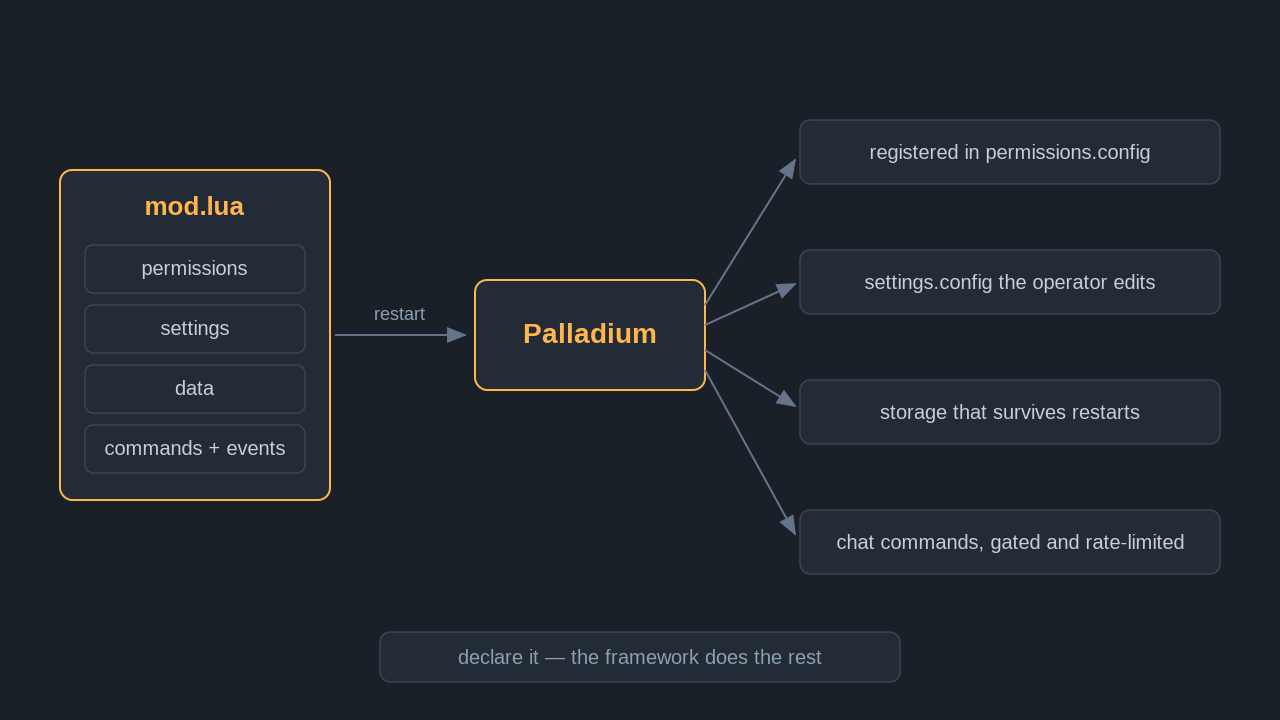
One file. examples/lua/GoldStreak/mod.lua returns a table, and that table is the
whole mod — what it is, what it owns, and what it does:
return {
    name = "GoldStreak",
    version = "1.0.0",
    description = "Gold for sticking with it: a reward on every fifth respawn.",

    permissions = {
        { node = "goldstreak.reward", description = "earn gold on a respawn streak", default = "allow" },
    },
    settings = { every = 5, item = "Money", count = 50 },

    on = {
        ["player.respawn"] = function(event, pal)
            local who = event.subject.id
            if not pal.can(who, "goldstreak.reward") then return end
            local streak = (tonumber(pal.tag(who, "respawns")) or 0) + 1
            pal.set_tag(who, "respawns", streak)          -- outlives the restart
            if streak % pal.settings.every ~= 0 then return end
            pal.player.give_item(who, { item = pal.settings.item, count = pal.settings.count }, function(ok)
                if ok then pal.player.message(who, "Here is your gold.") end
            end)
        end,
    },

    commands = {
        ["!streak"] = {
            help = "!streak — how many respawns until the next payout.",
            node = "goldstreak.reward",
            params = {},   -- declares "takes nothing" — parsed, gated, formable
            run = function(event, args, pal) pal.player.message(event.subject.id, "…") end,
        },
    },
}
Drop the folder into ./mods and restart the server. Palladium finds it,
loads it, registers goldstreak.reward, and starts calling it. There is no
permission.register to remember, nothing to connect to, and no process to
run.
The manifest is Lua rather than JSON for a reason worth knowing: Palladium can write JSON but has no parser to read it. A Lua table needs no parser — the call that loads the file is the call that reads the manifest.
| Key | Meaning |
|---|---|
name |
Must match the folder name |
permissions |
Nodes the mod owns, each with a description and a default. They must start with the mod's own lowercased name |
settings |
Free-form table, reachable as pal.settings — the author's defaults; see the overlay below |
on |
One function per event type — player.join, player.chat, player.death, player.respawn, player.leave, npc.spawn, player.hour (a played hour completed), clock.minute and clock.day (server-local wall clock), player.item_use (experimental). What each one carries: what your handler receives |
commands |
Chat commands, each with a run, a help line and optionally a node to gate it. Declare target = "player" and params = { { name = "item", kind = "item_id", required = true }, … } and Palladium parses the line for you — positional or key=value, @Name resolved against who is online — checks the node with the values so constraints like where item in … or target_weight < 12 are enforced before run is called, and hands the result as run(event, args, pal, params, target). The Studio renders declared commands as forms with pickers. A command that declares nothing gets the raw line and its node is checked with the target alone — every shipped example mod declares |
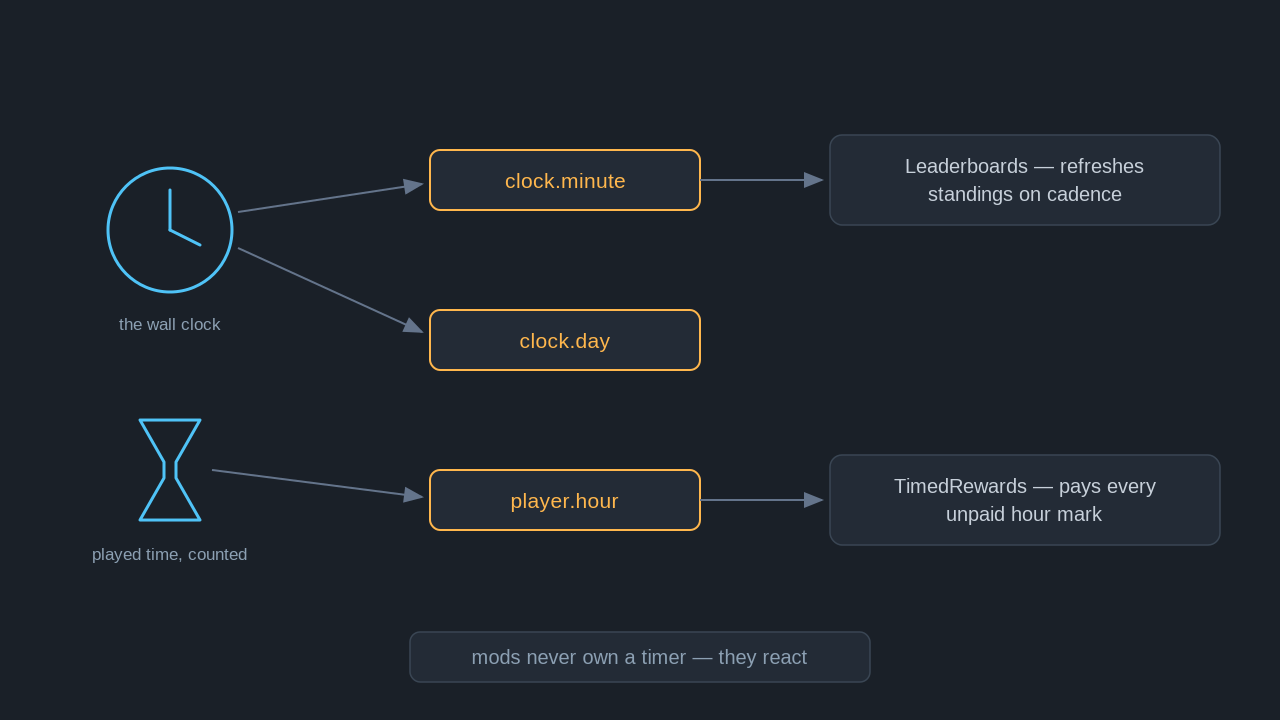
What your handler receives
Every handler is called with (event, pal). The event is the same envelope
that goes onto disk and over HTTP, so what you read here is what an external
program reads:
["player.join"] = function(event, pal)
  event.type            -- "player.join"
  event.at              -- unix seconds
  event.subject.id      -- "F8EAA197000000000000000000000000", the PlayerUId
  event.subject.name    -- "Löyly"
  event.subject.kind    -- "player"
  event.data.firstEver  -- false: this player has been seen before
  event.data.joins      -- 7
end
subject is who or what the event is about — a player, a pal, the server —
and data is what is specific to that event type. Both are always present;
data is an empty table for events that carry nothing extra.
| Event | subject |
data |
|---|---|---|
player.join |
player | firstThisRun bool · firstEver bool · firstSeen int · joins int |
player.chat |
player | message string |
player.death |
player | killer subject |
player.respawn |
player | — |
player.leave |
player | source string |
player.hour |
player | hours int · minutes int |
player.item_use |
player | count int · slot string · target string |
npc.spawn |
pal | species string · level int · rare bool |
clock.minute |
server | date string · weekday string · hour int · minute int |
clock.day |
server | date string · weekday string |
That table is a convenience copy. The authority — every event and every action, with each field's type, its range and whether it is required — is bridge-reference.md, generated from the same manifest the code is built from, so it cannot describe an event the agent does not publish.
What pal offers
Two layers, and the difference matters.
Every capability, under the manifest's own name. What chat calls
!give_item and HTTP calls player.give_item is pal.player.give_item here,
with the same parameters and the same permission node. The table is built from
the generated manifest at load time, so a capability cannot answer to one name
in one place and another name here, and a capability added to the manifest
needs no framework code to reach mods:
pal.player.give_item(who, { item = "PalSphere", count = 5 }, function(ok, err, data) … end)
pal.player.teleport(who, { to = other })
pal.pal.spawn_wild({ species = "BlueDragon_Ice", level = 20, aggressive = true })
pal.server.announce({ message = "the world boss is up" })
pal.permission.check(who, { node = "kits.daily" }, function(ok, err, data) … end)
An id comes first when the call names someone, and is simply left out when it
does not — pal.server.announce({ … }). done is optional and receives
(ok, err, data); actions reach the engine on the game thread, so an answer is
never available on return. Every name and parameter is in
bridge-reference.md, including the payload of each event
your on handlers receive.
And the framework's own services, which are not capabilities and so keep their own names:
| Call | Does | Why it is not a capability |
|---|---|---|
pal.call(type, userid, params, done) |
Any capability by its full name | The generic form of the table above |
pal.can(userid, node) |
May this player? | Resolves in-process and answers immediately; permission.check is a queued call |
pal.tag(userid, key) · pal.set_tag · pal.delete_tag |
A stored value per player, surviving restarts | Namespaced to your mod, so two mods can both keep a count. player.get_tag reads the raw, shared key instead |
pal.data(name) |
A handle on one of your declared collections | Scoped to your mod. pal.data.list and friends are the capabilities, over any collection |
pal.settings · pal.log · pal.name |
Your settings, your log line, your name | Framework state, not engine calls |
pal.message, pal.heal, pal.announce and pal.give still work and say
once in the log that they have moved — they were player.message,
player.heal, server.announce and player.give_item under invented names,
which is exactly the drift the one manifest exists to prevent.
pal.give was the last one to go, and it took a real fix to retire: it existed
because it read the inventory back and the plain capability did not, so the two
were not the same call. That read-back now lives inside player.give_item
itself, which means a chat command, an HTTP call and a mod all learn whether
the items actually arrived — ok is false and delivered is false when an
unknown item id was accepted and added nothing.
The operator's settings.config
The settings table in mod.lua is the author's defaults. The operator's
word is settings.config beside the mod's data — it survives mod updates,
and it is re-read within seconds of an edit, so tuning a reward needs no
restart. A mod may ship a commented settings.example.config next to its
code; on the first load that finds no live settings.config, the example
becomes it — a fresh install gets a real file to open, already explaining
itself, and updates only ever refresh the example, never the operator's
copy. Plain key = value lines; dotted keys reach into tables and numeric
segments make list positions:
; examples/lua/TimedRewards/settings.config
rewards.1.hours = 1
rewards.1.item = Money
rewards.1.count = 250
Any top-level key the file mentions replaces that default wholesale — a
half-merged list surprises everyone. true/false and numbers coerce,
everything else stays text. A mod that reads pal.settings at use time sees
edits immediately; one that copied a value into a local at load keeps the old
value until the next boot.
Answers arrive through a callback rather than a return value, because actions
run on the game thread and some of them defer past it. The callback is given
(ok, err, data), where data is the result's fields by name.
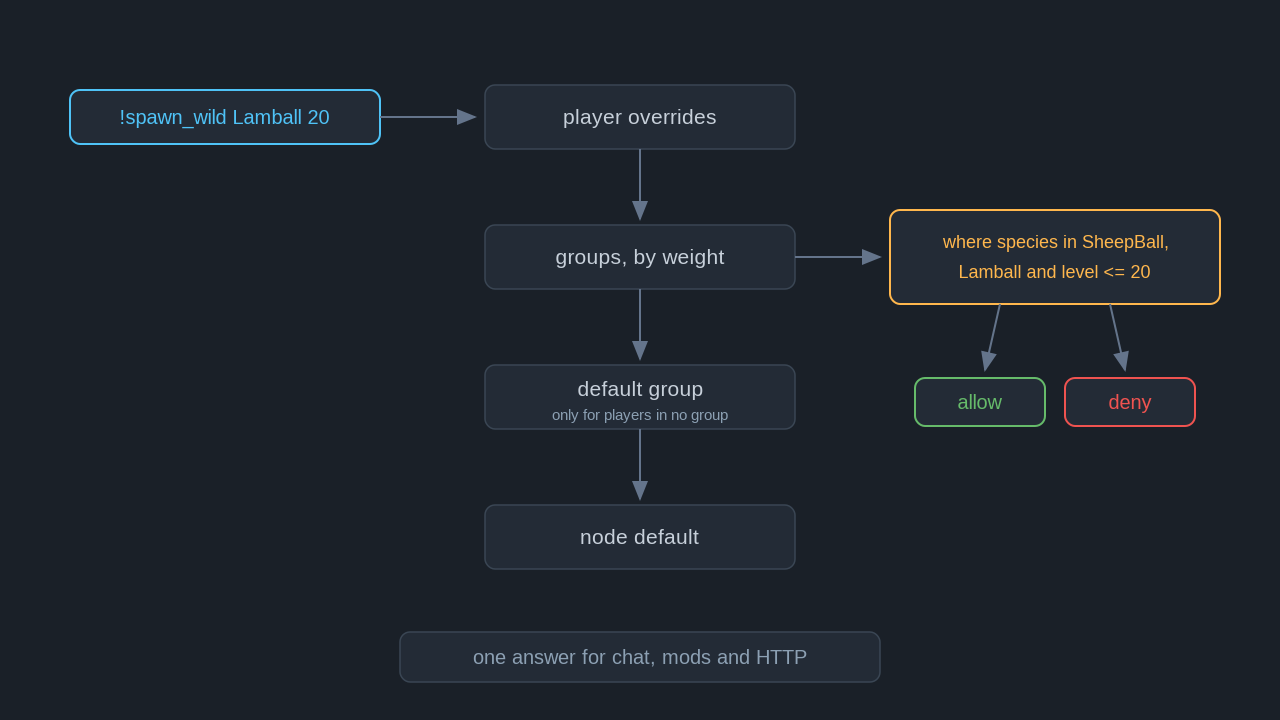
pal.can resolves against permissions.config: the player's overrides first,
then their groups by weight — the default group answering for players in none —
then the node's registered default. An exact node beats kits.* beats *,
with deny winning ties.
There is one set of permissions and one file. A mod asks in-process, the panel
and script mods ask through permission.check, and an operator edits the file
by hand. All three see the same answer.
Changing a node's default without touching the mod
A mod declares its permission nodes in mod.lua, and that is the only place a
mod declares them. What an operator changes is the default — whether a node
answers allow or deny when no group and no override says anything — and that
lives in the mod's own settings.config, under [nodes]:
; Mods/Palladium/mods/BigMod/settings.config
reward_every = 5

[nodes]
bigmod.reward = allow    ; earn the reward on a streak
bigmod.admin = deny      ; administer the mod
One config per mod folder, so there is never a second file saying something different. The studio writes this section for you — the default column in the permission grid is exactly these lines — and a hand edit is picked up on the next server restart, because nodes register as a mod loads.
Full-line comments (; or #) only. A line that makes no sense is named with
its number in the log and skipped; the rest of the file still applies.
Every mod keeps its own files
A mod's config and its records live in its own folder, beside the code:
Mods/Palladium/mods/
├── Palladium/
│   ├── permissions.config  groups, grants and node defaults — central
│   ├── .data               the player registry, tags, locations, species
│   └── generated/          written by the build; do not edit
│       └── catalog.ref     every item, species and trait id, with its name
└── GoldStreak/
    ├── settings.config     your settings for it, and its nodes
    ├── .data               its records
    ├── goldstreak.config   a collection it declared with storage = "config"
    └── generated/
        └── commands.ref    the commands it adds, as the engine sees them
Palladium keeps its own folder in the same shape as a mod's, so there is one
rule rather than two: a folder per owner, its config at the top, its records in
.data, and anything the build wrote under generated/.
Updating a mod means unzipping the new folder over the old one, and a release archive contains only what the author shipped — never the generated files — so your config and its data survive. Deleting the folder is a complete uninstall.
Permissions stay in one file rather than one per mod: a group spans every mod,
so splitting membership across them would leave no answer for which copy wins.
A mod still ships its node declarations in mod.lua, which is what you read
before installing it.
permissions.config
Mods/Palladium/mods/Palladium/permissions.config, written by Palladium and
yours to edit:
; groups: what they allow and deny, and which one everybody is in
[groups default]
deny = goldstreak.reward
is_default = true
weight = 0

[groups vip]
allow = kits.daily
allow = pal.spawn where species in SheepBall,Lamball
tag = VIP
weight = 10

; every permission node the installed mods registered, and its default
[nodes]
goldstreak.reward = allow    ; earn gold on a respawn streak
welcomekit.kit = allow       ; receive the starter kit on first join

; per-player group membership and overrides, by 32-hex player id
[players F8EAA197000000000000000000000000]
deny = welcomekit.kit
groups = vip
[nodes]fills itself in. Install a mod, restart, and everything it can gate is listed with the default it asked for.- Your change to a default wins. A mod re-registering on every boot will not put its own opinion back over yours.
- Edits are picked up within seconds, no restart. Writes from the panel or a mod rewrite the file and keep records you added by hand.
- Comments do not survive a rewrite — same deal as
mods.txt. - A wrong edit is reported, never silently dropped. A section naming no
collection, a field that is not declared, a value of the wrong type or a line
that is not
key = valueis logged with its line number and shown on the mods page — with the near miss named, since it is nearly always a typo. What parses is still loaded: one bad line must not cost you the file. - A constraint narrows a grant to the calls that satisfy it:
allow = pal.spawn where species in SheepBall,Lamball
allow = pal.spawn where level <= 20 and rare = false
allow = player.teleport where x >= 0 and x <= 1000
Operators: in (comma-separated), =, !=, <, <=, >, >=, joined
with and. Matching happens in the agent, so a mod calling
pal.can(who, node, params), the !pal.spawn command and an as: call over
HTTP all get the same answer. A constrained grant checked without the
parameters answers no — it cannot be relied on, so it is not widened.
- A chat command also carries who it is aimed at, so a grant can be
narrowed by target. target is the target's id, spelled @me when it is
the caller; target_group and target_weight are the target's
highest-weight group and that group's weight:
allow = player.heal where target = @me
allow = player.teleport where target_group != admins
allow = player.heal where target_group in member,vip
allow = player.teleport where target_weight < 12
The last shape is the hierarchy: a moderator at weight 12 may move anyone
below 12, never a peer or an admin. Acting on yourself always passes a rank
constraint — @me weighs -1, beneath every group — so nobody's own
commands go dark because of their own rank. Standing is derived inside the
resolver, so the same entry gives the same answer in chat, from a mod's
pal.can, and from a permission.check over HTTP. When a call names a
group (group.assign, group.set_entry), group_weight is that group's
weight — allow = group.assign where group_weight < 12 lets a moderator
promote members without being able to mint another moderator or an admin.
- Alternatives join with or, and and binds tighter:
allow = player.teleport where target = @me or target_weight < 5 reads as
"yourself, or anyone below weight 5".
- A grant can carry an end date: until 2026-09-01 (midnight starting
that day, server-local) or until 2026-09-01T14:30, written after any
constraint. An expired entry simply is not there anymore:
allow = player.heal where target = @me until 2026-09-01
permission.grant and group.set_entry take the stamp as their until
parameter.
- @Name targets the online player of that name (case-insensitive):
!teleport @Löyly and target=@Löyly both resolve to their id, and a name
nobody online carries refuses the command rather than guessing. @me stays
yourself.
- Writes are audited. Every write-scope capability run from chat or by a
mod appends one line to logs/bridge-audit.log — when, who (or which mod),
the action, its target and parameters. The HTTP door's audit lives in the
panel's database; between the two, every state change has a trail.
player.message is exempt, or every greeting would drown the file.
Storing anything else
Permissions are three collections, and a mod declares its own the same way:
data = {
    homes = {
        description = "where players set their home",
        fields  = { x = "number", y = "number" },
        storage = "data",     -- or "config", for a file you mean to hand-edit
    },
},
local homes = pal.data("homes")
homes:set(who, { x = "120.5", y = "88.0" })
homes:get(who)   homes:all()   homes:delete(who)
storage |
Kept in | For |
|---|---|---|
data |
the append log, indexed in memory | thousands of records nobody hand-edits |
config |
mods/<Mod>/<mod>.config |
a handful an operator owns |
Declaring is what makes a collection discoverable: data.collections lists
every one with its owner, storage class and field shape, and data.list,
data.get, data.set and data.delete read and write any of them — so the
panel, a CLI and an external program all change values through one door. Only
the owning mod can open its own collections from Lua.
data.set carries a record's fields as ordinary call parameters
(collection=shop.listings record=L1 item=PalSphere price=500), because this
runtime has no JSON parser. List-valued fields cannot be set that way yet.
Every capability is also a command
!pal.spawn species=Lamball level=20 in chat makes the same call the HTTP door
makes, gated by the same permission node — and those nodes are registered
deny, so out of the box this is an admin surface and nothing else. Grant
pal.spawn to a moderators group and its members get the command; nobody else
sees anything change.
- Every capability answers to its short name when no other capability ends the
same way:
!healis!player.heal,!teleportis!player.teleport.!statsstays ambiguous, so the full!player.statsor!pal.statsit is. - Parameters are
key=value, the same shape the action queue carries — or positional, matched to the declared parameters by kind:!pal.spawn IceDrake 25 [WorldTree_ATK]reads species, level and traits in order, numbers seeking number-shaped parameters and[bracketed]values seeking string-shaped ones. @meanywhere means the caller's own player id.target=<32-hex id>acts on somebody else; without it the caller is the target.!commandslists every word the caller may actually use — mod commands and capabilities alike, filtered by the caller's own permissions.?<command>explains one: declared parameters, kinds, ranges and defaults. A mod command answers with itshelptext when the mod declares one.- A mod command that declares
targetandparamsis parsed exactly the same way — positionals,key=value,@Name— and its node is checked with the parsed values, which is what makes a value or rank constraint on it real. - A mod's own command wins over the built-in of the same name, so a mod can
offer a friendlier
!spawnwithout taking!pal.spawnaway. - One command per player per two seconds, refusals included.
Autocompletion in your editor
Both kinds of mod come with types generated from the same manifest as everything else, so an editor offers the real capabilities with their real parameters — and says so when one is misspelt. Nothing loads at runtime; these files exist only for the editor.
Lua mods. mods/Palladium/Scripts/generated/palladium.def.lua declares
pal, every namespace, every parameter table and the event shape for
lua-language-server (the VS Code "Lua" extension by
sumneko, and most other editors). The .luarc.json at the root of this
repository already points at it, so a mod written inside a clone gets
completion with no setup. Writing a mod elsewhere: copy that file next to your
mod, or add its folder to workspace.library. Annotate the handler and the
types follow:
---@param event PalEvent
---@param pal Pal
["player.join"] = function(event, pal)
    pal.player.give_item(event.subject.id, { item = "PalSphere", count = 5 })
    pal.player.give_itm(...)   -- Undefined field `give_itm`
end
Script mods. A root jsconfig.json maps
@pal-up/mod-sdk to the types, so a mod written anywhere in this repository
completes with no npm install and no build step — VS Code, VSCodium and
anything else running the TypeScript language server pick it up from the
JSDoc. packages/mod-sdk/index.d.ts types the client and
generated/capabilities.d.ts types every capability, so TypeScript checks the
call, the parameters and the shape of what comes back:
const r = await pal.player.give_item(id, { item: 'PalSphere', count: 5 });
r.data.delivered;                       // boolean
await pal.player.give_item(id, { itm: 'PalSphere' });
//                              ~~~ 'itm' does not exist. Did you mean 'item'?
A capability that names a player takes the id first; one that does not starts
at the parameters, and the types enforce exactly that — pal.server.announce({
message }) takes no id, and the editor will not offer one.
Both files are regenerated by node packages/shared/generate.mjs along with
everything else, and CI fails if they drift, so the completions can never
describe a capability the server does not have.
Writing a mod against a version of this
A mod may declare which shape of the framework it was written against:
return { name = "Kits", api = 1, … }
Declaring nothing means "whatever is current", which is the honest reading of every mod written before there was a number. A mod asking for an API this Palladium does not speak is refused with the reason, rather than loading and misbehaving where the author cannot see it.
How mods are found, loaded and isolated
- Every mod's records live in
Mods/Palladium/mods/<Mod>/.data— tab-separated, appended and periodically rewritten, since this runtime has no JSON parser and no database. A line torn by a crash is dropped and the file healed on the next load. On Pal-Up the loader reads an rsync copy of the mod folders, so Palladium writes to the originals instead;PALLADIUM_MODS_SOURCEnames them, rather than the framework guessing and risking a write that the next boot's sync undoes. - Palladium reads
Mods/Palladium/mods.listfor the names to load. Pal-Up regenerates it on every boot from./mods, honouring.disabledmarkers; a standalone server maintains it by hand, exactly like BPModLoaderMod'sload_order.txt. If the file is absent, Palladium falls back to asking the loader for a directory listing. - Each mod is loaded with its own environment: it reads every global it needs and writes only to itself, so a mod that assigns a global cannot disturb Palladium's.
- Every handler runs under
pcall. A mod that throws is named in the log with its reason, and the next mod still gets the event. - Events are queued when they are published and delivered when the action poll drains the queue, so mod code never runs inside an engine hook. A slow handler delays other mods; it does not stall the game.
- A mod that does not load — no table returned, a syntax error, a permission node outside its namespace — is reported and skipped. Nothing else changes.
Writing a script mod instead
A mod that must reach the network cannot live in the game process: UE4SS Lua
has no sockets. That is what script mods are for — a folder with a mod.json
and an entry file in JavaScript or TypeScript, run by the panel, with
permissions and tags reached through the same capabilities.
The client one runs against is packages/mod-sdk, which
documents what a mod exports and everything pal offers on that side. Script
mods need Pal-Up; Palladium mods do not.
How the Lua half is loaded
Sync happens on every container start: docker compose restart palworld
after changing mod folders. Mods removed from ./mods are removed from the
server; folders Pal-Up didn't put there (UE4SS's bundled mods) are left
alone. Folders with a mod.json and no scripts/ are skipped — they have no
Lua half, and the panel is already running them.
Enabling / disabling
server/Mods/mods.txt is regenerated on every boot (MODS_TXT_MODE=managed):
UE4SS's bundled defaults + every folder in ./mods that has a Lua half,
enabled unless a .disabled marker exists:
touch mods/CoolMod/.disabled     # keep the files, skip loading
rm    mods/CoolMod/.disabled     # re-enable
docker compose restart palworld
The same marker governs the other two kinds. A Palladium mod is left out of the
mods.list Palladium reads, so it stops loading on the next restart; a script
mod stops or starts on the spot, since the panel owns its process and the
toggle button writes the marker for you.
This kills the classic "my mods.txt reset after restart" problem: the file is
supposed to be regenerated — from state you control. Power users who want
exotic load orders set MODS_TXT_MODE=manual and own the file themselves.
Note: some mods ship an enabled.txt that would force-enable them in UE4SS
regardless of mods.txt. In managed mode Pal-Up strips that file from the
synced copy so the enable/disable toggle always wins (your folder in ./mods
is left as downloaded). In MODS_TXT_MODE=manual, enabled.txt is preserved
and behaves as UE4SS defines.
Linux caveats (read before reporting a broken mod)
- C++ mods must be Linux-native. The Linux UE4SS cannot load Windows
.dllfiles; a C++ mod needs to be recompiled by its author as a Linux.so(loaded fromlibs/instead ofdlls/). Most aren't (yet). - Client-side mods don't belong on the server. Anything visual (UI, textures, models seen only by players) goes on the player's machine. A server-side mod changes rules/spawns/logic for everyone.
- PalSchema mods (JSON-based tweaks) are reported to work on Linux servers; treat version compatibility carefully and test — the framework itself historically depends on UE4SS.
- The official Pocketpair mod system (
Mods/Workshop+PalModSettings.ini, added in 1.0) supports Windows dedicated servers only — that's exactly why this project vendors the community UE4SS Linux port instead. If a future patch enables it on Linux, drop yourPalModSettings.iniintoconfig/persist/(see below) and it will survive restarts.
Surviving game updates
Game patches routinely break UE4SS (memory offsets move). Pal-Up's model:
- Run with
UPDATE_ON_BOOT=hold— the game version stays put until you decide, no matter how often the container restarts. - When a patch lands, check the pinned fork —
Qiiks/ue4ss-linux-palworld,
the build every Pal-Up server runs — for a compatible release, then re-pin:
./packages/server-image/ue4ss/vendor.sh --pin <new-tag>and rebuild the image. The upstream repo is where those fixes are being merged, not a build to run: its releases are missing part of the Linux fix set and theUE4SS_Signatures/overrides, and a server on them crashes on the first chat command (#1, troubleshooting). docker compose run --rm palworld update(auto-backup happens first), start, and test withMODS_ENABLED=true. If the server crashes on boot, flipMODS_ENABLED=falseto confirm it's mod-related, then bisect with.disabledmarkers.
Files that keep resetting
Any config file the game or a mod regenerates can be pinned: put your copy
under config/persist/ (inside the data volume) at its server-relative path,
e.g.:
config/persist/Pal/Binaries/Linux/PalModSettings.ini
config/persist/UE4SS-settings.ini
Persisted files are copied over the server tree on every boot, after Pal-Up's own config generation — your file always wins.
Mods that talk to the outside world
UE4SS Lua has no network access, so a mod that wants to reach anything outside
the game process has to go through a file on the shared volume. Palladium
ships that route for in-game events and the panel serves them over HTTP. That
is why script mods exist at all — see
writing a script mod instead above, or
docs/bridge.md if you are writing a tool rather than a mod.
Where do I even get mods?
Nexus Mods and CurseForge, "Palworld" section. Pal-Up deliberately has no automatic downloader (Nexus Mods' API terms restrict automated downloads); download archives yourself and drop them in.